ByeType for macOS Is Here — Press to Talk, Release to Paste
Wei-Ren Lan
Have you ever thought about how much time you spend typing every day — and how much of it you could save?
Whether you’re replying to messages, writing emails, taking notes, or adding comments in your IDE — your thoughts move far faster than your fingers. macOS’s built-in dictation? Limited accuracy, and it can’t adapt formatting to the context you’re working in. Third-party tools? They either upload your voice to the cloud or require a clunky workflow.
ByeType for macOS has a simple goal: Press to talk, release to paste. Everything happens on your Mac. Your voice never leaves your computer.
Table of Contents
- Core Features
- 5 Speech Recognition Engines
- AI-Powered Enhancement
- Context-Aware Styles
- Live Floating Captions
- Privacy First
- Getting Started
- Model Comparison
- Closing Thoughts
Core Features
Global Hotkey — Speak Anytime, Anywhere
ByeType lives in the macOS menu bar, taking up zero Dock space. In any app, press your configured hotkey to start recording. Release it, and ByeType automatically transcribes, enhances, and pastes the result right where your cursor is.
No window switching. No manual pasting. Your focus stays unbroken.
Two trigger modes:
- Press and Hold: Hold the hotkey while you speak, release to finish — perfect for quick phrases
- Double-Tap Lock: Double-tap to enter hands-free mode, tap again to stop — ideal for longer dictation
Auto-Paste with Clipboard Safety
After transcription, ByeType safely saves your current clipboard contents, pastes the transcribed text, then automatically restores your original clipboard. You’ll never lose what you previously copied just because you used voice input.
5 Speech Recognition Engines
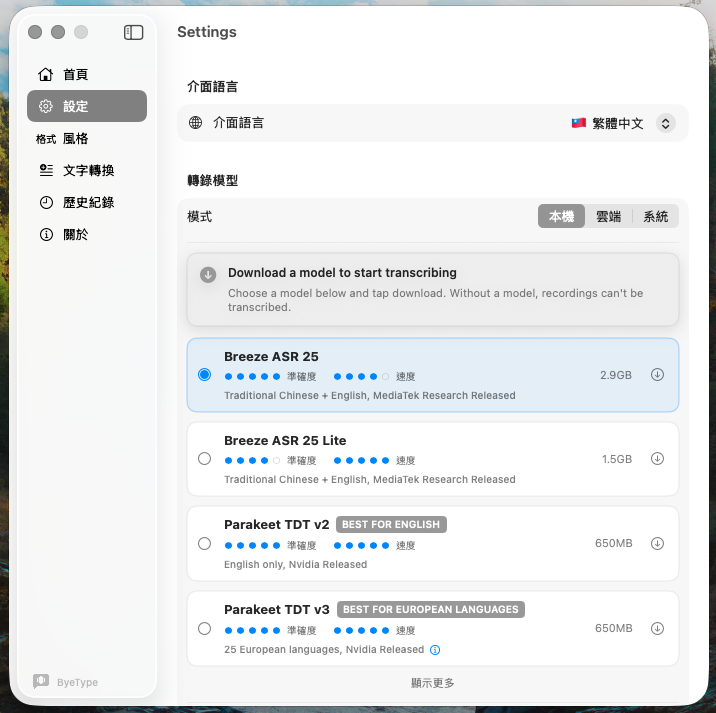
ByeType supports 5 speech-to-text engines, all running locally on your Mac via Core ML — no internet required:
- Breeze ASR 25 (MediaTek) — Best choice for Traditional Chinese + English, optimized for Chinese
- Parakeet TDT v3 (Nvidia) — Fast multilingual recognition across 25 European languages, the default engine
- Qwen3 ASR 0.6B (Alibaba) — Broadest language coverage with 30+ languages including Chinese dialects
- WhisperKit (OpenAI Whisper) — Classic multilingual models in multiple sizes
- Apple Speech Recognition — Zero setup, no download, uses built-in system capabilities
Every engine can be switched with a single click in Settings, and model downloads include progress tracking and storage info.
AI-Powered Enhancement
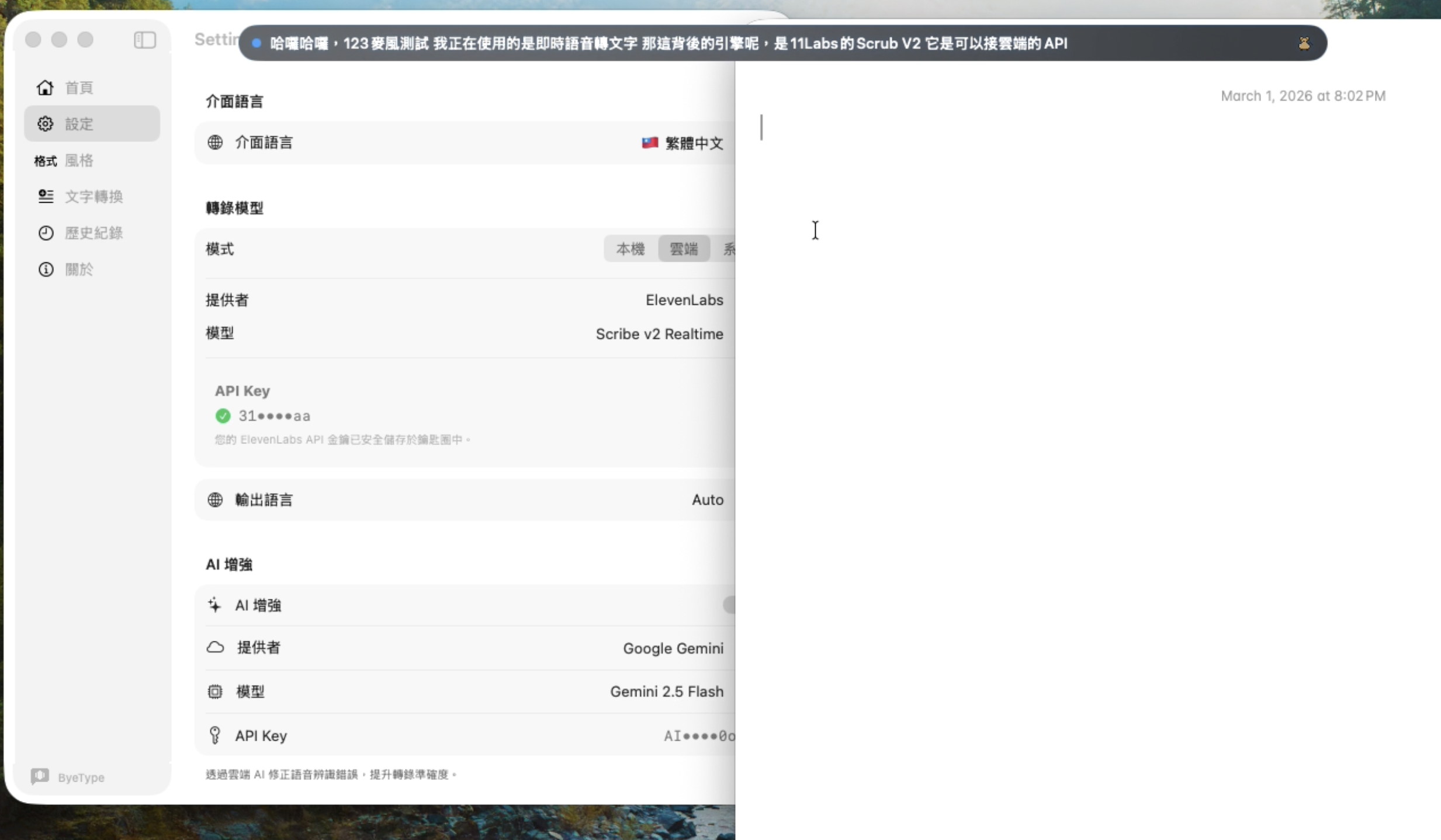
Raw speech recognition output often lacks punctuation, contains errors, and has messy formatting. ByeType’s built-in AI enhancement automatically:
- Fixes transcription errors and misheard words
- Adds appropriate punctuation
- Removes filler words (um, uh, like, you know)
- Adjusts formatting based on context
Three enhancement options:
- Local LLM (llama.cpp) — Fully offline, download the model once and use it forever, maximum privacy
- Cloud LLM — Supports OpenAI / Anthropic / Google Gemini / Groq / Mistral, high quality with model selection
- Apple Intelligence (macOS 26+) — Uses Apple’s built-in FoundationModels, no extra setup needed
Context-Aware Styles
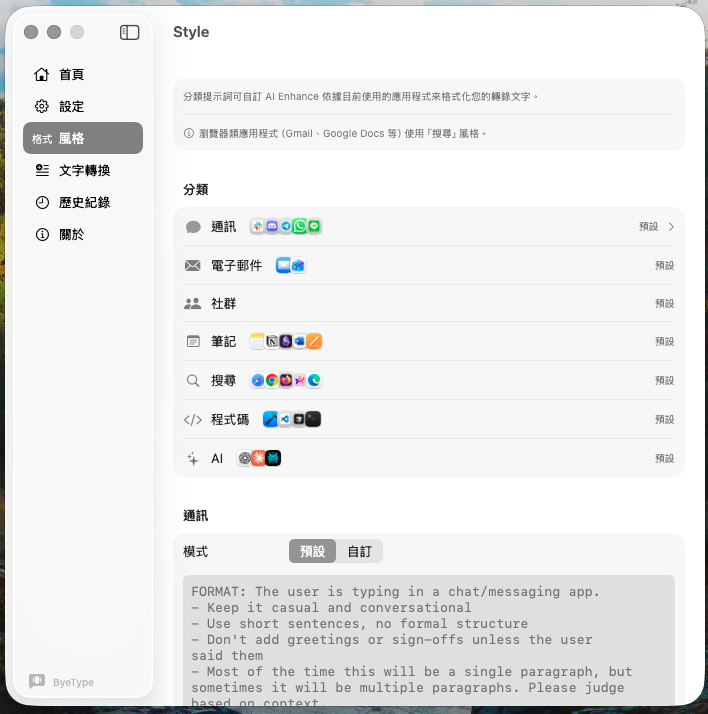
ByeType automatically detects which app you’re using and applies the appropriate formatting style:
| Context | Example Apps | Style |
|---|---|---|
| Messaging | Slack, Discord, LINE, Telegram | Casual, concise |
| Mail, Gmail, Outlook | Formal, structured | |
| Notes | Notion, Obsidian, Bear | Bullet points, clear |
| Code | Xcode, VS Code, Cursor | Comment format |
| AI Chat | ChatGPT, Claude | Complete questions |
| Search | Chrome, Safari, Arc | Keywords |
| Social | X, Facebook, Instagram | Social tone |
Every prompt is fully customizable. If you have specific writing styles or formatting preferences, just edit them in the Style tab.
Live Floating Captions
While recording, a small capsule appears near the Notch area at the top of your screen, showing in real time:
- Waveform animation — so you know it’s listening
- Text as it’s being recognized — see results while you speak
- Processing animation — visual feedback during AI enhancement
The capsule automatically follows your mouse across multiple displays.
And here’s an easter egg: a tiny pixel art character randomly appears on the capsule — a Formosan Leopard Cat, Taiwan Black Bear, Blue Magpie, or Muntjac. They react to your voice level: standing still when quiet, walking when you speak, running when you’re loud, and thinking during transcription.
Privacy First
When it comes to voice input, privacy matters more than ever — your voice carries not just words, but your voiceprint, speech patterns, and even your emotions.
ByeType’s design principles:
- Speech recognition runs 100% on-device: All STT engines use Core ML — audio never leaves your Mac
- No account system: No registration, no login, no personal data collected
- No cloud sync: History, settings, and models are all stored locally on your Mac
- AI enhancement can be fully offline: Choose local LLM or Apple Intelligence — even the text stays on your machine
- API keys stored securely: If you use cloud LLMs, your API keys are stored in macOS Keychain, never in plain text
Getting Started
System Requirements
- macOS 14.0+ (Sonoma or later)
- Apple Silicon (M1 or later)
- Microphone permission + Accessibility permission
Installation
- Download ByeType DMG
- Open the DMG and drag ByeType.app into Applications
- On first launch, grant Microphone and Accessibility permissions
If macOS Gatekeeper blocks the launch, right-click ByeType.app and select “Open”.
Recommended First Setup
- English users: The default Parakeet TDT v3 (650 MB) is fast and accurate for European languages
- Chinese users: Download Breeze ASR 25 (2.9 GB) for the best Traditional Chinese recognition
- AI Enhancement: Choose local LLM for privacy, or set up your preferred cloud LLM API key for quality
Model Comparison
| Model | Provider | Size | Languages | Accuracy | Speed | Recommended For |
|---|---|---|---|---|---|---|
| Breeze ASR 25 | MediaTek | 2.9 GB | Chinese + English | ★★★★★ | ★★★★ | Best Traditional Chinese |
| Breeze ASR 25 Lite | MediaTek | 1.5 GB | Chinese + English | ★★★★ | ★★★★★ | Chinese, less storage |
| Parakeet TDT v3 | Nvidia | 650 MB | 25 European languages | ★★★★★ | ★★★★★ | Daily multilingual use |
| Qwen3 ASR 0.6B | Alibaba | 2.5 GB | 30+ languages | ★★★★★ | ★★★★ | Broadest language coverage |
| Qwen3 ASR 0.6B Lite | Alibaba | 700 MB | 30+ languages | ★★★★ | ★★★★ | Multi-language, less storage |
| WhisperKit Large v3 | OpenAI | 1.5 GB | Multilingual | ★★★★ | ★★ | Quality first |
| WhisperKit Tiny | OpenAI | 73 MB | Multilingual | ★★ | ★★★★ | Quick drafts |
| Apple Speech | Apple | Built-in | Varies by macOS | ★★★ | ★★★★ | Zero setup |
Closing Thoughts
ByeType for macOS is the culmination of years of experience in voice AI. From choosing the right speech recognition engines, to designing context-aware AI enhancement, to every interaction detail — the goal has always been to build a voice input tool you’ll actually use every day.
If you have feature suggestions or feedback, head over to the Roadmap — every submission is read and considered.
I’m Weiren, with over 7 years of experience in AI system development, specializing in speech recognition, audio intelligence, and on-device machine learning. I’ve taken ASR, noise reduction, and real-time inference from concept to production across multiple AI projects. ByeType brings together my years of hands-on experience in voice technology to build a voice input tool that truly works for you.
Let’s connect on LinkedIn
Wei-Ren Lan
7+ years building production AI systems, specializing in speech recognition, audio intelligence, and on-device ML deployment. Previously led an AI team shipping ASR, speech denoising, and real-time inference to production. ByeType combines years of hands-on voice technology expertise into a voice input tool that actually works.